A hotel sauna controller has to work for more than the person sitting inside the sauna. It also has to work for reception, housekeeping and the facilities team.
Imagine a property with six sauna-equipped guest suites and one shared spa sauna. Guests want to adjust the heat independently. Housekeeping needs to know what to do after checkout. Spa staff need the shared room ready at opening time, without leaving it heating unnecessarily after closing.
All three needs affect the same purchasing decision. Before comparing touchscreens or Wi-Fi features, hotel buyers should decide which settings guests may change, which staff must manage and how the system will enforce that division.
A well-chosen sauna control panel makes the division practical. This guide explains how to design those permissions, test a proposed system and avoid confusing guest convenience with remote-start safety.
1. Start with the Hotel's Operating Policy, Not the Touchscreen
A basic temperature dial can be enough for a home sauna. Hospitality introduces several people with different responsibilities. A guest is concerned with comfort; a spa employee is concerned with bookings; a facilities manager is concerned with reliable operation and equipment access.
Problems arise when these responsibilities are not defined before the equipment is ordered. For example, a controller may have a timer, but that does not answer whether a guest may extend it. A product may advertise Wi-Fi, but that does not tell reception whether it can start the heater remotely or what safety conditions apply.
The first specification should therefore be an operating rule, not a feature list:
- Who is permitted to start and stop heating?
- What temperature choices should guests see?
- Who can change maximum heating time or scheduled hours?
- What must staff check between guests or after closing?
- What should happen when the network is unavailable or the system reports a fault?
These questions determine which control functions matter. They also help avoid paying for features that do not fit the hotel's actual workflow.
2. Three Hotel Sauna Locations Need Three Different Control Strategies
The same guest-access policy will not work equally well in every property.
| Setting | Guest experience | Recommended operating approach |
|---|---|---|
| Private hotel suite | One booking party uses the sauna independently | Let guests adjust approved comfort settings; protect administrator settings and define a checkout procedure. |
| Bookable private spa room | Use is tied to a reservation and a changeover period | Staff coordinate readiness and end-of-session checks; guest adjustments stay within the booked session's rules. |
| Shared hotel spa sauna | Multiple guests use the room during stated opening hours | Staff own operating hours, baseline temperature and system settings; avoid competing guest adjustments. |
Private Suites: Convenience Matters Most
Requiring guests to call reception just to raise or lower the temperature undermines the point of an in-room sauna.
Yet allowing access to advanced settings can complicate the next guest's experience.
In-room controls should be understandable without a technical manual, with clear limits set by the property.
This is also a design consideration, not just an electronics question.
KLAFS's hotel spa-en-suite guidance discusses private sauna use within guest accommodation and describes an automatic four-hour shutoff in one of its solutions.
That duration is product-specific, but it illustrates why private access and defined operating limits belong in the same discussion.
Bookable Spa Rooms: The Schedule Matters Most
A 45-minute booking does not mean a heater can reach its operating temperature in 45 minutes.
Preheating, guest use, cleaning and the next booking are different phases.
Someone must be responsible for confirming readiness and ending the previous session.
A schedule feature may help, but it does not replace the hotel's room-check procedure.
In a common sauna, one guest's temperature preference should not repeatedly override the experience of everyone else.
The practical approach is usually a staff-managed setting with clearly displayed opening hours and a simple way for guests to request help.
Tylö's commercial sauna example shows how scheduling and remote access can support management from a reception desk or office.
The buying implication: Define the room's operating model first. Then ask the supplier which controller functions can implement it.
If you are still deciding between in-room and bookable facilities, our Hotel Sauna Design guide explores that earlier planning choice.
3. Which Sauna Settings Should Guests Actually Control?
An effective access policy separates comfort choices from system boundaries.
The following matrix is a starting point for a hotel specification, not a claim that every controller offers these permissions individually.
| Function | Guest access to consider | Staff or administrator responsibility |
|---|---|---|
| Temperature | Adjust within an approved range in private rooms | Set permissible minimum and maximum values |
| Heater start/stop | Allow where the room, equipment and operating rules support it | Define who checks the room and when heating may start |
| Heating duration | View the remaining session or choose permitted options, if supported | Set maximum on-time and session rules |
| Scheduled operation | Usually hidden from guests | Coordinate opening hours, reservations and preheating |
| Lighting or presets | Offer straightforward choices where the system supports them | Set defaults and ensure controls are easy to understand |
| Advanced configuration | No routine guest access | Protect menus, service settings and administrator credentials |
| Remote access | Generally limited to authorized personnel | Assign accounts, permissions and safety procedures |
Two extremes are unhelpful.
Unrestricted access lets each user alter the next session's operating conditions.
No guest access can make a private-suite amenity frustrating and increase requests for staff assistance.
The middle ground is more useful: guests choose the experience within approved boundaries; staff decide those boundaries.
The actual temperature range or time limit should never be copied from another property without checking the heater instructions, local rules, guest profile and intended use.
Ask suppliers to demonstrate which settings can truly be locked, hidden or limited on the proposed model.
4. What This Looks Like During a Real Hotel Working Day
Consider an illustrative scenario, not a reported customer project: a hotel operates six suites with private saunas and one shared spa sauna.
Before a Guest Arrives
The hotel has already defined each suite's permitted temperature range, session limit and instructions.
The facilities team has commissioned the control system.
Housekeeping follows the property's checklist for confirming the room and equipment are ready; it does not change hidden technical settings.
During the Stay
The guest selects a comfortable temperature using the local panel.
They cannot enter the protected settings menu or extend a fixed session limit unless the hotel's policy and system specifically permit it.
If the panel reports an error, a clear instruction directs them to contact staff instead of experimenting with configuration menus.
At Checkout
Housekeeping checks the sauna according to its handover procedure, including whether heating has stopped.
Where approved monitoring exists, authorized staff may review equipment status as an additional check.
Remote visibility should not be treated as proof that the room is physically clear or safe.
The spa team manages the daily opening and closing process.
Any scheduled preheat is coordinated with the required physical safety checks and the installed system's remote-operation rules.
Guests do not continuously change the shared room's baseline temperature.
If Something Goes Wrong
The hotel knows who can access administrator settings, who to contact for technical support and how to respond if Wi-Fi is lost or a safety device interrupts operation.
The fallback procedure is documented before the system is handed over.
Notice what this example does not assume: the controller cannot automatically perform the duties of housekeeping, prove that a room is clear of objects or replace a trained operator.
The technology is useful when responsibilities around it are equally clear.
5. Harvia Fenix Guest Mode: One Practical Way to Enforce Limits
Once the access policy is defined, a real controller can be evaluated against it.
Harvia provides an example using Fenix Guest Mode in a hotel room.
Guests can adjust temperature between 60°C and 80°C, while heater on-time is locked to two hours.
A four-digit PIN restricts the settings menu. The system can also enable or disable timer access.
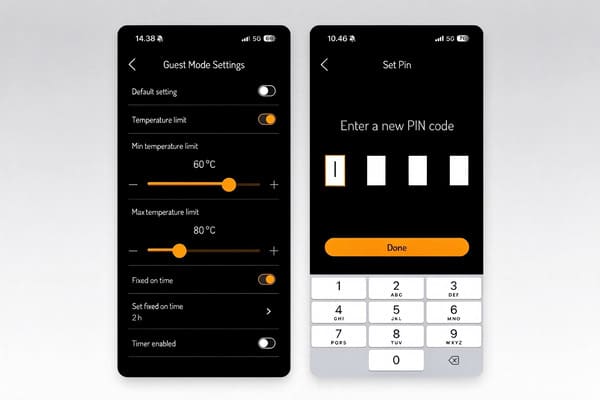
Official Harvia Guest Mode interface example. Source: Harvia Fenix documentation.
The value of this example is not the particular temperature or duration.
It is that the hotel can distinguish a guest's permitted adjustment from a manager's operating limit.
These figures are an example configuration, not universal hotel defaults.
Other systems take different approaches.
HUUM's UKU support guidance distinguishes heating-time options for private, semi-public and public saunas.
It is another reminder that a controller's intended use matters as much as its interface.
Do not transfer one manufacturer's settings to another product without checking its instructions.
6. Guest Mode, Scheduling and Remote Start Are Not the Same Thing
The word smart can conceal important differences.
Hotel buyers should ask suppliers to explain four separate functions:
- Guest permissions: What a person using the local panel is allowed to change.
- Scheduling: When the controller is configured to operate, subject to the product's functions and safety requirements.
- Remote monitoring or control: What authorized employees can see or do through a connected app or management platform.
- Safety protection: The physical and electrical measures required for the intended type of operation.
For example, Harvia Fenix includes built-in Wi-Fi, but its standard MyHarvia Core license supports remote monitoring rather than remote heater start.
Remote starting requires MyHarvia Control or an eligible package that includes it.
Purchasing a Wi-Fi model does not settle the remote-start question.
Why Remote Starting Needs a Separate Safety Decision
A local guest-access PIN does not establish that the sauna is safe for remote operation.
According to Harvia's safety-device guidance, professional remote-use configurations call for suitable protection, such as its SFE device, while certain heater models have integrated safety protection.
The precise equipment and operating conditions must be confirmed for the selected heater and installation.
Do not assume a door sensor supplied for a home sauna is suitable for a public facility.
The IEC 60335-2-53:2026 standard addresses the safety of specified electric sauna heating appliances and infrared units with rated power input not exceeding 20 kW.
Its stated scope includes installations in hotels and other public sauna settings.
It is a useful technical reference, not proof that the latest edition has already been adopted into every country's local regulations.
Finally, ask the installer to demonstrate the expected behavior if Wi-Fi drops, a remote command fails or a safety input is triggered.
Those responses are product- and configuration-dependent and should be verified during commissioning rather than assumed.
7. What Hotel Buyers Should Ask Suppliers to Demonstrate
A sales brochure can confirm that a function exists.
It cannot prove that the proposed controller, heater and operating policy work together.
Before approving the purchase, request a demonstration and a written configuration record.
| Acceptance check | What the supplier or installer should show |
|---|---|
| Guest temperature limit | The guest interface cannot select a value outside the approved range. |
| Administrator separation | A guest cannot change the maximum time, schedules or protected settings without authorization. |
| Session ending | The installed system follows the configured end-of-session behavior; staff know how to verify shutdown. |
| Local versus remote functions | The team can identify which actions work on the panel, which require a network and which require a separate license. |
| Connectivity failure | Actual behavior during loss and restoration of network access is documented and demonstrated safely. |
| Safety devices | A qualified installer verifies the specified protective equipment and its response using the approved test procedure. |
| Staff handover | Reception, housekeeping and facilities staff receive the correct instructions for their roles. |
Ask for documentation showing the exact control-panel model, heater model and kW, electrical supply, power unit, sensors, remote-use accessories and included software functions.
These details matter particularly when upgrading an existing installation: a replacement panel may fit physically without offering every feature expected by management.
For the electrical and power-matching side, see our Commercial Sauna Control Units Buyer's Guide.
For planning room layout, ventilation and equipment access together, see the Commercial Sauna Installation Guide.
A Stronger RFQ Starts with Operations
Instead of asking only for a "smart sauna control panel," send suppliers these project details:
- Site and use: Country, private suites versus public spa, number of rooms and expected operating hours.
- Existing equipment: Heater model, kW rating, voltage/phase, present controller and available drawings.
- Guest policy: Who may start heating, adjustable temperature range, session limit and whether presets are needed.
- Staff workflow: Booking schedules, monitoring needs, administrator access and checkout/closing checks.
- Safety and handover: Expected remote operation, applicable local requirements, installer responsibilities and training needs.
This gives the supplier something testable to quote.
It also reduces the chance that a convenient touchscreen arrives without the functions or accessories needed in daily operation.
Frequently Asked Questions
Should Guests Be Able to Start a Private Hotel Sauna Themselves?
They may be able to, but the decision depends on the room's intended use, the approved control configuration and applicable safety requirements.
Decide how the room will be checked, how guests receive instructions and who responds to faults before enabling unattended operation.
Is a Two-Hour Heating Limit Required for Hotel Saunas?
No. Two hours is part of Harvia's published Fenix hotel-room example, not a universal requirement.
Select operating limits for the actual equipment and venue rather than copying an illustrative setting.
Does a Wi-Fi Sauna Controller Automatically Allow Remote Starting?
No. Connectivity, monitoring and remote starting are different capabilities.
Check software licensing, device compatibility and the required safety equipment.
For example, Harvia distinguishes MyHarvia Core monitoring from Control remote start.
What Happens If the Hotel's Wi-Fi Stops Working?
The answer depends on the control system.
Request a supervised demonstration of local operation, fault indications and recovery behavior.
The hotel should have a documented procedure rather than assuming all functions continue unchanged.
Can a Hotel Replace Only the Sauna Control Panel?
Sometimes.
Harvia says various compatible XE and XW systems can use a Fenix replacement panel, but it lists important compatibility exclusions and remote-function limitations.
Verify exact model and part numbers before committing to a panel-only upgrade.
Can Guest Mode Replace Remote-Start Safety Equipment?
No. Guest Mode restricts settings access.
Safety switches, sensors and other protective measures serve separate purposes.
The qualified installer must specify protection appropriate to the exact equipment, application and local requirements.
Specify the Operating Experience Before You Buy
The right sauna control panel for hotels is not necessarily the one with the most features.
It is the one that lets guests make appropriate comfort adjustments, gives staff clear operational control and can be demonstrated to work safely as a complete system.
For hotels, resorts and commercial wellness projects, ROC Sauna-Solution can help review compatible Harvia heaters, control units and room configurations.
Share your room count, existing equipment and intended guest-versus-staff permissions so the proposal addresses the way your property will actually operate.
Discuss your hotel sauna control requirements with ROC Sauna-Solution.
References
-
Harvia Support. Harvia Fenix 2026. Updated October 14, 2026. Covers Guest Mode, license distinctions and compatibility.
-
Harvia Support. Safety Devices for Electric Heaters. Covers home-use door sensors, professional SFE devices and integrated protection.
-
International Electrotechnical Commission. IEC 60335-2-53:2026, published October 15, 2026. Safety requirements for specified sauna heating appliances and infrared cabins.