A hotel sauna that opens at 7 AM, a fitness club that operates until late evening, and a spa with different weekend hours all have one thing in common: their sauna operating schedules are not always the same.
For commercial facilities, manually starting and stopping a sauna every day can create unnecessary work for staff.
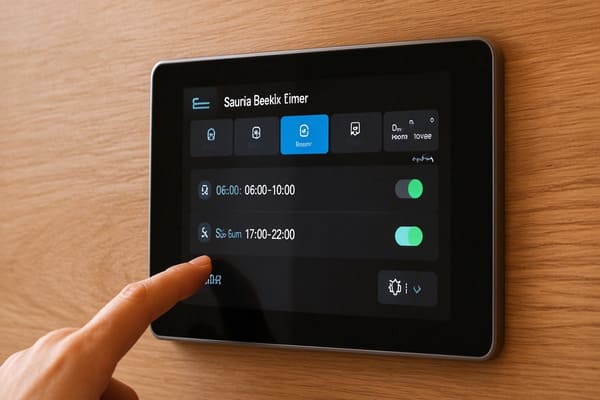
A modern sauna control panel with weekly scheduling can help operators manage heating times, temperature settings, and lighting according to a planned operating schedule.
In November 2026, Harvia introduced a new Week Clock function for its Fenix control system, adding more scheduling options for professional sauna operations.
But what does this update actually mean for hotels, spas, and commercial sauna operators? And what should buyers check before specifying a scheduled control system?
1. What Is Weekly Scheduling in a Sauna Control Panel?
Traditional sauna timers generally allow users to set a heating duration or a delayed start.
Weekly scheduling goes further.
Instead of adjusting the sauna every day, operators can create predefined programs based on the facility's weekly operating routine.
Depending on the control system, these programs may include:
- Heating start and stop times
- Target sauna temperature
- Different operating schedules for different dates or days
- Lighting control
- Automatic rest periods and operating restrictions
For commercial facilities with predictable opening hours, this can make daily sauna management more consistent.
It is important to understand that weekly scheduling is a specific feature of compatible control systems, not something available on every sauna timer or control panel.
2. Harvia Fenix Introduces a New Week Clock Function
On November 6, 2026, Harvia added a Week Clock function to its Fenix control system through a MyHarvia 2 update.
According to Harvia's official Fenix 2026 update documentation, the feature is designed for professional use.
The system supports up to eight individual programs, allowing operators to configure:
- Dates and operating schedules
- Target temperature
- Heating start and stop times
- Lighting settings
This provides more flexibility for facilities that operate according to different schedules throughout the week.
What Does This Mean for Commercial Operators?
Consider a hotel with a sauna that operates during morning and evening periods.
Previously, staff might need to adjust the operating schedule manually or rely on a basic timer.
With a compatible weekly scheduling system, recurring operating periods can be configured in advance.
The same concept can apply to:
Hotels and resorts
Schedule sauna heating around regular guest access hours, including different weekday and weekend routines.
Fitness clubs
Align sauna operation with gym opening hours and expected member usage.
Spas and wellness centres
Plan heating periods around scheduled treatment sessions, guest appointments, and facility opening hours.
The main advantage is operational consistency. It does not automatically guarantee lower energy consumption or eliminate the need for staff supervision.
3. Understanding the Six-Hour Rest Period
One particularly important part of the Harvia Fenix Week Clock update is its automatic rest-period setting.
After each scheduled program ends, the system starts a six-hour rest period.
During this period, the sauna cannot be started by the next scheduled program.
Harvia also specifies that disabling this restriction requires continuous on-site supervision of the sauna.
For commercial operators, this is an important detail when planning operating schedules.
Why Does This Matter?
Imagine a wellness facility that operates several sauna sessions throughout the day.
The operator should consider:
- The time when the previous program ends
- The required rest period
- The next scheduled operating period
- Whether continuous supervision is available
- Whether the facility's operating requirements are compatible with the default restriction
A weekly schedule should never be designed without considering these operating limitations.
Important: A scheduled start function should not be interpreted as permission to operate a sauna without appropriate supervision or safety arrangements.
Always follow the manufacturer's instructions and applicable local requirements.
4. Five Things Commercial Buyers Should Check Before Choosing a Sauna Control Panel
A scheduling feature may look attractive, but it should not be the only reason to select a control system.
For commercial projects, the complete configuration matters.
1. Heater Compatibility and Power Capacity
The control panel must be compatible with the selected sauna heater.
Before ordering, confirm:
- Heater model
- Rated power in kW
- Supply voltage
- Single-phase or three-phase configuration
- Whether a separate power unit is required
A control panel designed for a smaller heater cannot automatically be used with a higher-output commercial heater.
For larger installations, the controller and power unit may need to be specified together.
See our Commercial Sauna Control Units Buyer's Guide for a more detailed explanation of heater and controller compatibility.
2. Scheduling Flexibility
Not every commercial facility follows the same operating routine.
A hotel may have different weekday and weekend hours, while a gym may operate on a more consistent schedule.
Buyers should confirm:
- How many independent programs are available?
- Can different dates have different settings?
- Can heating start and stop times be adjusted?
- Can lighting be included in the schedule?
- Are there automatic rest-period restrictions?
For the Harvia Fenix Week Clock, the current official documentation specifies up to eight individual programs.
3. Temperature and Sensor Management
Temperature control is not simply about choosing a number on the screen.
The controller depends on correctly installed temperature sensors and compatible equipment.
Harvia explains that the Fenix system uses sensors and control logic to manage sauna heating and support safe operation.
For commercial buyers, it is important to confirm:
- Temperature sensor compatibility
- Correct sensor installation location
- Temperature adjustment range
- Overheating protection
- Compatibility with the selected heater
A poorly configured sensor system can affect temperature regulation and the overall sauna experience.
4. Safety Devices and Remote Operation
Wi-Fi connectivity and remote control can be useful, especially when staff need to manage facilities from outside the sauna room.
However, remote operation requires additional attention to safety.
For example, Harvia's SFE safety switch instructions explain the safety-switch configuration for remote use with compatible Fenix systems.
The manufacturer also specifies that installation of the SFE safety switch must be performed by a qualified electrician.
Buyers should confirm the required safety devices, door sensors, installation arrangements, and supervision procedures before enabling remote operation.
Remote access and weekly scheduling are separate functions. Having one does not automatically mean that every remote-control or safety requirement has been satisfied.
5. Installation and Future Maintenance
The control panel is only one component of the complete sauna heating system.
Depending on the project, the installation may also involve:
- Power control unit
- Temperature sensors
- Door sensors
- Safety switches
- Lighting connections
- Ventilation connections
- Network or Wi-Fi configuration
The control panel should be installed in a suitable location where authorized staff can access it and maintenance technicians can service the system.
For a broader overview of equipment coordination, electrical planning, and installation, see our Commercial Sauna Installation Guide.
5. Is Weekly Sauna Scheduling Suitable for Every Commercial Facility?
Not necessarily.
The feature is most useful when a facility has predictable operating hours and recurring heating requirements.
| Facility Type | Potential Application |
|---|---|
| Hotels | Regular morning and evening operating periods |
| Resorts | Different schedules for weekdays, weekends, and seasonal operations |
| Fitness clubs | Heating schedules aligned with opening hours |
| Public wellness centres | Predefined operating periods |
| Private spas | Planned heating periods around appointments |
Facilities with highly variable guest demand may still require manual adjustments and additional operational monitoring.
For projects with several sauna rooms, buyers should also distinguish between individual weekly scheduling and centralized management.
A weekly timer does not automatically mean that multiple rooms can be managed through one central system.
Confirm the available network functions, compatible devices, software access, and regional service support before purchasing.
6. What the Harvia Fenix Update Means for Future Sauna Projects
The introduction of the Week Clock function reflects a wider development in commercial sauna equipment: control systems are becoming an increasingly important part of facility management.
Modern buyers are no longer evaluating a sauna heater only by its heating power or appearance.
They are also considering:
- How the sauna is operated every day
- Whether heating schedules can be configured in advance
- How lighting and ventilation are controlled
- Whether staff can monitor system status
- How safety requirements are maintained
- Whether the control system can support future operational needs
Harvia Fenix is one example of this development.
Its built-in Wi-Fi, MyHarvia 2 connectivity, customizable heating profiles, and new Week Clock function provide additional options for compatible sauna installations.
You can review the Harvia Fenix product specifications for more information about the control system.
For electrical equipment intended for the European market, buyers should also consider applicable requirements under the European Commission's Low Voltage Directive.
The final equipment selection should always be based on the complete project specification rather than one additional software feature.
Conclusion
A modern sauna control panel can do more than regulate temperature and heating duration.
For commercial facilities, weekly scheduling can help coordinate sauna operation with opening hours, guest access, and daily management routines.
Harvia's new Fenix Week Clock provides up to eight individual programs for professional use, together with a six-hour automatic rest-period requirement.
However, the most suitable control system still depends on heater compatibility, electrical configuration, safety devices, and the facility's actual operating requirements.
For hotels, spas, and gym projects, these details should be confirmed before the equipment is ordered.
Need Help Selecting a Commercial Sauna Control System?
ROC Sauna-Solution supplies commercial sauna heaters, control units, power units, and customized sauna equipment for hotels, spas, gyms, distributors, and installation contractors.
Whether you are planning a new sauna facility or upgrading an existing system, our team can help review:
- Sauna room dimensions and heater capacity
- Compatible control panels and power units
- Voltage and electrical requirements
- Scheduling and remote-control requirements
- Safety devices and installation configuration
Send us your sauna room dimensions, preferred heater model, electrical specifications, and operating schedule.
We can help you review a suitable control configuration for your project.
Explore Our Professional Sauna Controllers
Contact ROC Sauna-Solution for a Project Quote
Frequently Asked Questions
1. What is a sauna control panel used for?
A sauna control panel manages functions such as temperature, heating duration, and operating settings. Depending on the model, it may also control lighting, ventilation, humidity, scheduling, and remote functions.
2. What is the Harvia Fenix Week Clock?
It is a weekly scheduling feature introduced in the MyHarvia 2 update on November 6, 2026. It is intended for professional use and supports up to eight individual programs.
3. Can a sauna control panel automatically schedule heating?
Some compatible systems support scheduled heating. The available functions depend on the control unit, software, heater compatibility, and configuration.
4. What is the six-hour rest period in Harvia Fenix?
After each Week Clock program ends, an automatic six-hour rest period begins. The sauna cannot be started by the next scheduled program during this period. Disabling the restriction requires continuous on-site supervision.
5. Can I control a commercial sauna remotely?
Some compatible control systems offer Wi-Fi and remote operation. However, remote operation may require additional safety devices, correct configuration, and professional installation.
6. Does every sauna heater work with the same control panel?
No. Compatibility depends on heater power, voltage, phase, control-unit capacity, and the manufacturer's specifications. Always confirm the complete configuration before ordering.